Protocol Downgrading Attacks: How Attackers Weaken Your Security
Imagine you're locking your front door with a modern, unpickable lock — but your visitor insists you use the old rusty lock instead because “it's easier.” You reluctantly agree… and someone breaks in.
This is the essence of a protocol downgrading attack: an attacker forces two parties to use a weaker, less secure protocol version (or cipher suite) than they originally intended, making it easier to intercept or manipulate the communication.
These attacks are particularly dangerous because:
They target the negotiation stage of communication.
They don't require breaking modern encryption — they make you use something easier to break.
They often happen without the end-user noticing.
How Protocol Downgrading Works
When two systems communicate securely (e.g., via TLS in HTTPS), they negotiate:
Protocol version (e.g., TLS 1.3, TLS 1.2, SSL 3.0)
Cipher suite (specific encryption + hashing algorithms)
If both sides support multiple options, the negotiation usually selects the highest common version.
Attackers step in here.
They intercept the negotiation (often with a Man-in-the-Middle position) and alter the handshake messages so that both sides believe the other only supports weaker options.
Real-World Examples
POODLE (2014)
Forced clients to fall back from TLS to SSL 3.0, which was vulnerable to padding oracle attacks.
Logjam (2015)
Downgraded Diffie-Hellman key exchange to 512-bit “export” grade keys, making decryption possible.
DROWN (2016)
Exploited SSLv2 fallback in TLS servers to break encryption.
Protocol downgrading attacks don't break the best locks — they make you use the worst ones.
They thrive in environments where legacy support is kept “just in case.”
Key takeaways for security operators:
Always disable weak protocols.
Monitor handshake patterns for suspicious downgrades.
Use TLS_FALLBACK_SCSV and modern cipher suites.
Regularly test your systems for protocol negotiation weaknesses.
By staying vigilant, you can prevent attackers from downgrading your security to their advantage.
Bonus - Visualizing a Downgrade with Wireshark
A protocol downgrading attack is easier to understand if you can see it in action.
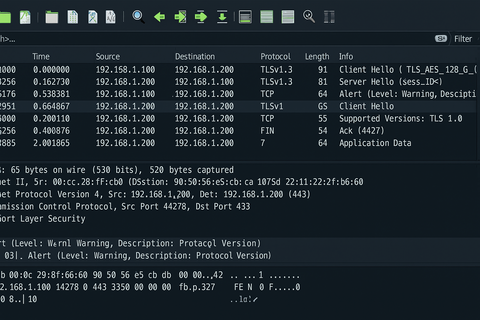
Let's run through a safe, lab-only example where we downgrade from TLS 1.3 to TLS 1.0 and capture the handshake in Wireshark.
1. Lab Setup
Requirements:
Two virtual machines (Client + Server)
A MITM system (Attacker) between them — can be done with:
ARP spoofing (lab network only)
Or simply routing traffic through your machine
Python downgrade script (from above)
Wireshark installed on the MITM machine
Server: Configure to support TLS 1.0 and TLS 1.3 for the demo.
Example with OpenSSL test server:
Handshake Protocol: Server Hello
Version: TLS 1.0 (0x0301)
Server picks the downgraded version, completing the attack.
5. Why This Is Dangerous
If the attacker downgrades to a weak protocol (like TLS 1.0 or SSL 3.0), they can:
Exploit known vulnerabilities in that protocol.
Use cryptographic attacks to recover session keys.
Impersonate one of the parties.
6. Blue Team Detection in Wireshark
You can detect suspicious downgrades by:
Checking if the negotiated TLS version is unexpectedly old.
Looking for multiple handshake attempts (downgrade sometimes happens after handshake failures).
Comparing supported versions in ClientHello with chosen version in ServerHello.
Example display filter:
ssl.handshake.version == 0x0301
(This will show all TLS 1.0 sessions.)
7. Defensive Measures Recap
In real-world deployments:
Disable legacy protocols entirely.
Implement TLS_FALLBACK_SCSV to reject downgraded connections.
Monitor with IDS/IPS rules for handshake tampering.
Summary with Visual Context
Seeing the before and after in Wireshark makes it clear:
Protocol downgrading is like tricking both parties into speaking an outdated language that everyone knows how to break. By catching it at the handshake stage, you can stop the attack before encryption is even established.
 Cybersecurity